

⏱ 1 min read
The Short Version
A staggering 25% weight loss suggests either a measurement error or catastrophic over-development, defying standard specialty coffee norms. Mastering the Skywalker V2 requires resisting the urge to spike burner power during the Maillard phase to avoid killing your roast consistency.
In This Article
Real talk: mastering a new roaster requires more than just following a recipe; it demands an understanding of how heat management dictates your final yield. After a previous attempt with Brazil Santos resulted in a burnt profile, shifting to a Colombian Excelso EP on the Skywalker V2 offered a much-needed lesson in control. By increasing the batch size to 300g and dialing back both burner intensity and airflow, the process felt significantly more manageable than smaller, more volatile loads.
Refining Heat Management
The transition from a 200g to a 300g batch provided a more stable thermal environment, though it introduced new complexities in drum speed and momentum. While an initial drop to 60% drum speed proved awkward for sampling, returning to 75% helped maintain better access to the beans. [A common pitfall occurs during the Maillard phase, where a sudden increase in burner power to combat perceived momentum loss can trigger a dangerous RoR spike.] Succumbing to that mid-roast panic is the fastest way to kill your consistency.
The Mystery of Mass Loss
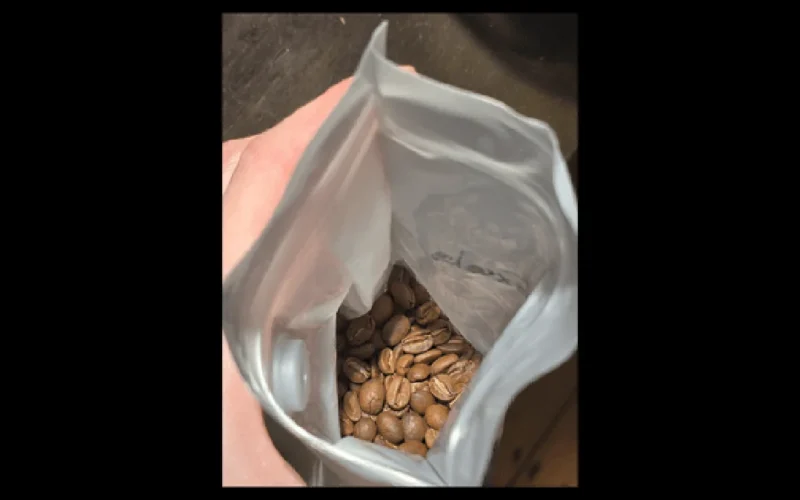
The most striking anomaly in this session was the final yield. Starting with 300g and ending with approximately 225g suggests a 25% weight loss, a figure that borders on the impossible for standard specialty coffee. Visually, the beans were beautiful and the aroma incredible, yet such extreme shrinkage screams measurement error or catastrophic structural over-development.
I suspect my airflow adjustments played a role; pulling too much air to manage heat might have accelerated moisture evaporation beyond the point of recovery. Achieving a high-quality profile is one thing, but maintaining mass retention is vital to roasting economics. If these beans are truly losing a quarter of their weight, I’ve crossed the line from development into carbonization. My next move is a hard audit of my scale calibration and charge temperature logs to fix this Skywalker V2 workflow.
Is a 25% weight loss realistic for a Colombian Excelso, or is something else going wrong with the measurements?
Questions & Answers
How does batch size affect roasting stability on the Skywalker V2?
Increasing the batch size from 200g to 300g provides a more stable thermal environment during the roasting process. While smaller loads can feel volatile and difficult to manage, larger batches offer better heat consistency despite introducing new complexities regarding drum speed and momentum. Using a larger load helps mitigate some of the fluctuations seen in smaller amounts, though it requires careful adjustment of airflow and burner intensity to maintain control throughout the entire profile.
Why might coffee beans experience extreme weight loss during a roast?
Extreme weight loss, such as a 25% reduction from the initial mass, is often caused by measurement errors or catastrophic structural over-development through carbonization. Excessive airflow used to manage heat can also accelerate moisture evaporation beyond the point of recovery, leading to significant shrinkage. While high-quality profiles are important, losing a quarter of the bean's weight suggests that the roasting process has crossed the line from proper development into damaging the beans.
What causes a sudden RoR spike during the Maillard phase?
A dangerous Rate of Rise (RoR) spike is often triggered by a sudden increase in burner power intended to combat perceived momentum loss. This common pitfall frequently occurs during the Maillard phase when a roaster panics and attempts to compensate for a slowing roast. Instead of maintaining consistency, this mid-roast adjustment can lead to unstable heat management and negatively impact the final profile of the specialty coffee being roasted on the Skywalker V2.
How should drum speed be adjusted for effective bean sampling?
Returning to a drum speed of approximately 75% helps maintain better access to the beans for sampling purposes. While lowering the drum speed to 60% might be attempted, it can prove awkward and difficult when trying to monitor the roast progress. Finding the right balance in drum speed is essential for managing the momentum of larger batches, such as a 300g load, while ensuring the roaster can still interact with the beans effectively.
Originally reported by Reddit Coffee Roasting.



[…] a roasting operation inevitably demands a leap from the predictable simplicity of a Bullet into more volatile territory. […]